Coming soon to theApp Store

A read-later app for iPhone, iPad and Mac

Save it now.
Read it properly later.

Unreadly keeps what you save from Safari, Chrome, the share sheet and your Shortcuts, and opens each one as a clean page in Charter: no ads, no pop-ups, nothing between you and the words.

Coming soon to theApp StoreSee how it reads

The Long Table

On Reading Slowly

Most of what we save, we never read. Not because it wasn’t worth it, but because the moment we found it was the wrong one: a queue at the post office, a meeting about to start, a train pulling in.

So we keep it for later. And later, if it’s going to be any good, has to be a different kind of place: quieter, with the clutter gone, the type set for a long sitting, and nothing asking us to subscribe.

A page set aside is a promise to come back. The least we can do is make coming back a pleasure.

A made-up page from The Long Table, with its header, ads, a newsletter box and a cookie banner, turns into a clean Article in Unreadly.

The clean-up: the first time a new save opens, the page’s clutter falls away into the Article.

Saving

Save from wherever you’re reading.

One tap from the share sheet, a click in your browser, a Control, a Shortcut or a paste. Saving the same link again brings the Article you already have back to the top, never a second copy.

  • The share sheet

    From any app on iPhone, iPad and Mac. From Safari it takes the page as you see it, even one you’re signed in to.

  • Safari

    The Unreadly extension, on all three. Save the page, or save it with a Snapshot of how it looks today.

  • Chrome, Edge, Brave and ArcMac

    Save with a click or ⌘⇧U. What you save waits for Unreadly, even with the app closed or the Mac offline.

  • Paste

    Copy a link and open Unreadly: + turns into Paste. One tap, and it’s in your Inbox.

  • Control Center

    Save Link from Clipboard saves the link you copied, without opening the app.

  • Shortcuts and Siri

    Save, find and open Articles from a Shortcut, or ask Siri to save the link for you.

  • Your AI agentsMac

    Agents and scripts on your Mac can save and organize through Unreadly, once you turn Agent access on.

  • Import

    Bring your library from Pocket, Instapaper, Omnivore, Raindrop, Readwise Reader or your browser’s bookmarks.

The Inbox

A reading list you actually finish.

Your Inbox holds what’s still to read. Mark an Article as read and it moves to the Archive, still there to read again and search. The week fills up as you go, and an empty Inbox says so.

Tags, Favorites, Smart collections and a Library of your Highlights keep the rest in order. Every move is one tap, and every move can be undone.

Try a save from

Inbox

4 to read37 min

10 read this week
  • The Long Table

    On Reading Slowly

    essays2 Highlights12 min left

  • Field Notes

    The Case for Boring Software

    dev/swift8 min

  • Small Batch

    Why Sourdough Needs Time

    cooking6 min

  • Outside In

    A Field Guide to Autumn Light

    photography11 min

Reading

A page made for reading.

Charter at the size you like, a measure that never runs too long, and a theme for every light. No ads, no pop-ups, no autoplay: the page, and nothing else.

The Long Table

On Reading Slowly

There is a kind of reading that only happens when nothing is in a hurry: not the page, not the reader, and not the thing around the page that wants you to click somewhere else.

A page set aside is a promise to come back. The least we can do is make coming back a pleasure: the words in a face made for long reading, a line short enough for the eye to find the next one, and a ground that suits the hour.

Slow reading isn’t slow for its own sake. It is how a good argument gets the time it needs, and how the best sentence in an essay gets found, kept and returned to, long after the tab that held it is closed.
  • Highlights and Notes

    Five inks, a Note on any Highlight, and all of them in one Library, by Article, Tag or date.

  • Listen

    Apple’s voices read the Article aloud, word by word, from the Lock Screen or in the car.

  • Translation

    Read an Article in your language, translated on your device. Your Highlights stay with the original.

  • Same line, next device

    Pick up where you stopped on your iPhone, iPad or Mac, at the same line, with Handoff.

Apple Intelligence

Ask your library. Check every answer.

Unreadly’s AI runs on Apple Intelligence. Every answer shows where it came from, every claim opens its passage, and one switch turns all of it off.

Ask your library
One question, answered from everything you’ve saved, on your device, with the passages it drew on.
Summaries and Key insights
A line at the top of an Article, and the points it makes, each one a link to its passage.
Key passages
The sentences a long Article turns on, marked in its own words.
Suggested Tags
Tags for a new save, the way you already tag. Nothing is applied until you say so.

It runs on your device, or on Apple’s Private Cloud Compute, where your text is used only for that request, is never stored, and isn’t accessible to anyone, not even Apple. Unreadly never sees it. AI needs a device with Apple Intelligence: iPhone 15 Pro or later, iPad with M1 or A17 Pro or later, or a Mac with Apple silicon.

Ask your library

What did I save about reading slowly?

Three of your Articles make the case. Slow reading gives an argument the time it needssource 1, a page set aside is a promise to come backsource 2, and writing things down is how you keep what you readsource 3.

  1. 1On Reading SlowlyThe Long Table
  2. 2On Reading SlowlyThe Long Table, your Highlight
  3. 3Notes on Writing Things DownField Notes

AI can be wrong. Tap a source to read it.

iPhone, iPad and Mac

At home on every device you read on.

A native app on each: tabs on iPhone, three columns on iPad and Mac, and the keyboard shortcuts you’d expect. Built for iOS 27, iPadOS 27 and macOS 27, and nothing older.

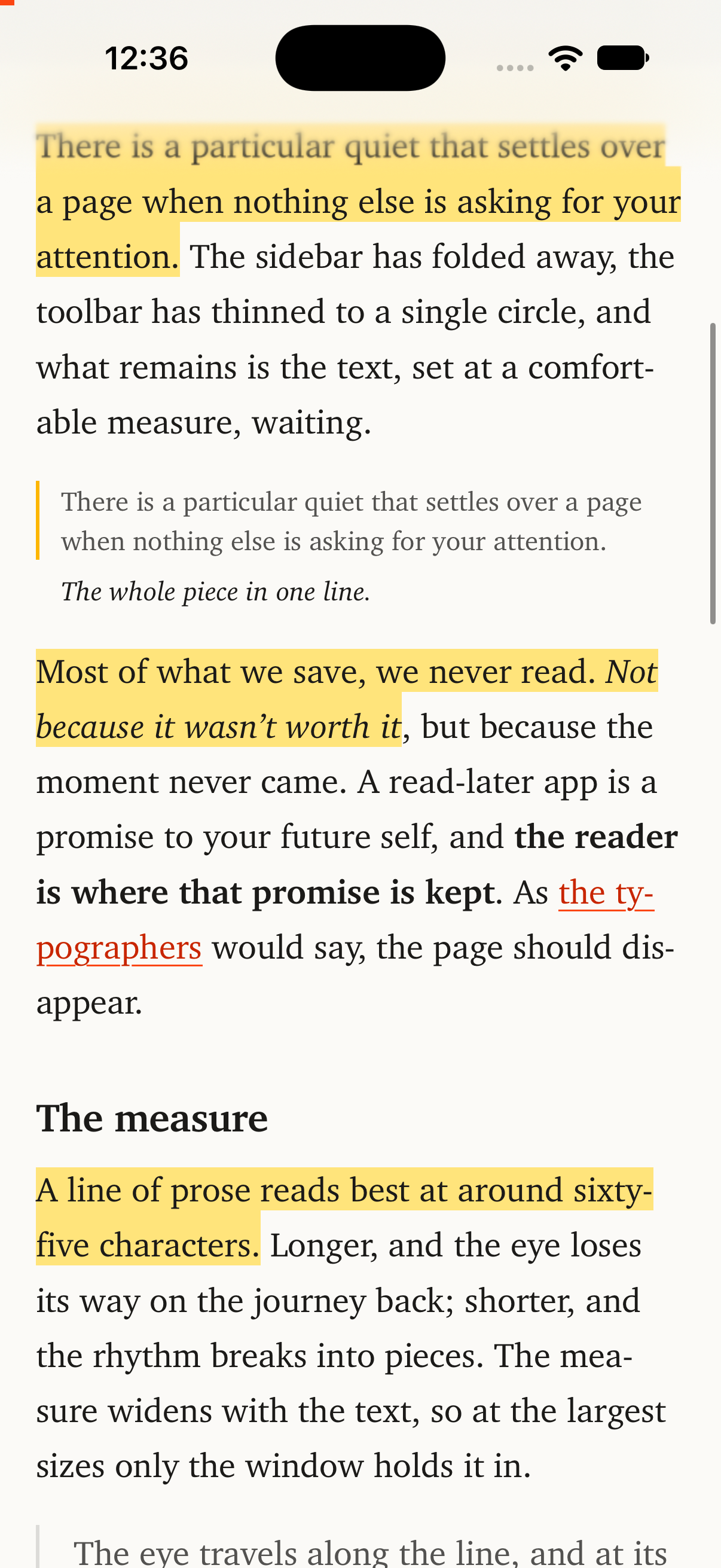
The reader on iPhone, with three Highlights in yellow in an Article.
Highlights, in the text
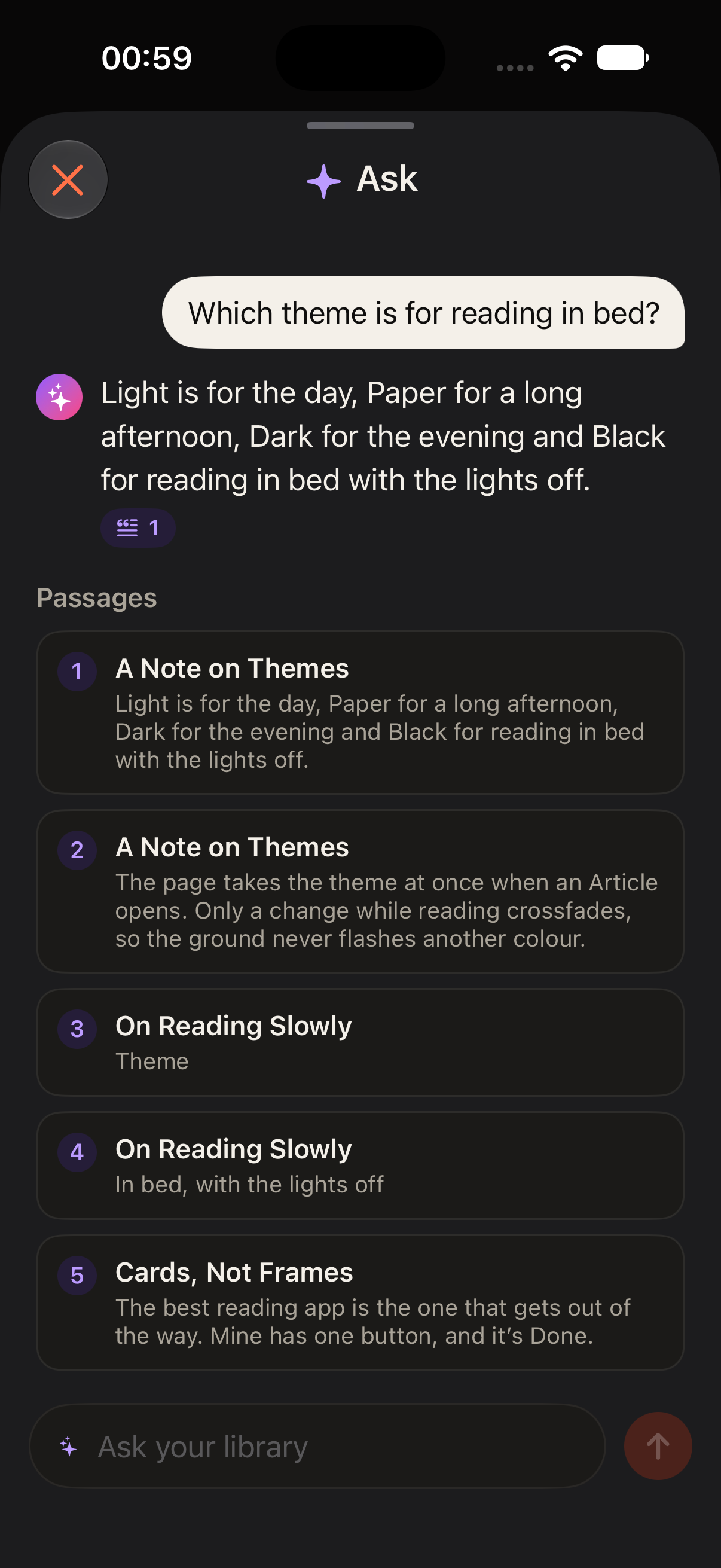
Ask your library on iPhone, in Dark: an answer with the five passages it drew on.
Ask your library
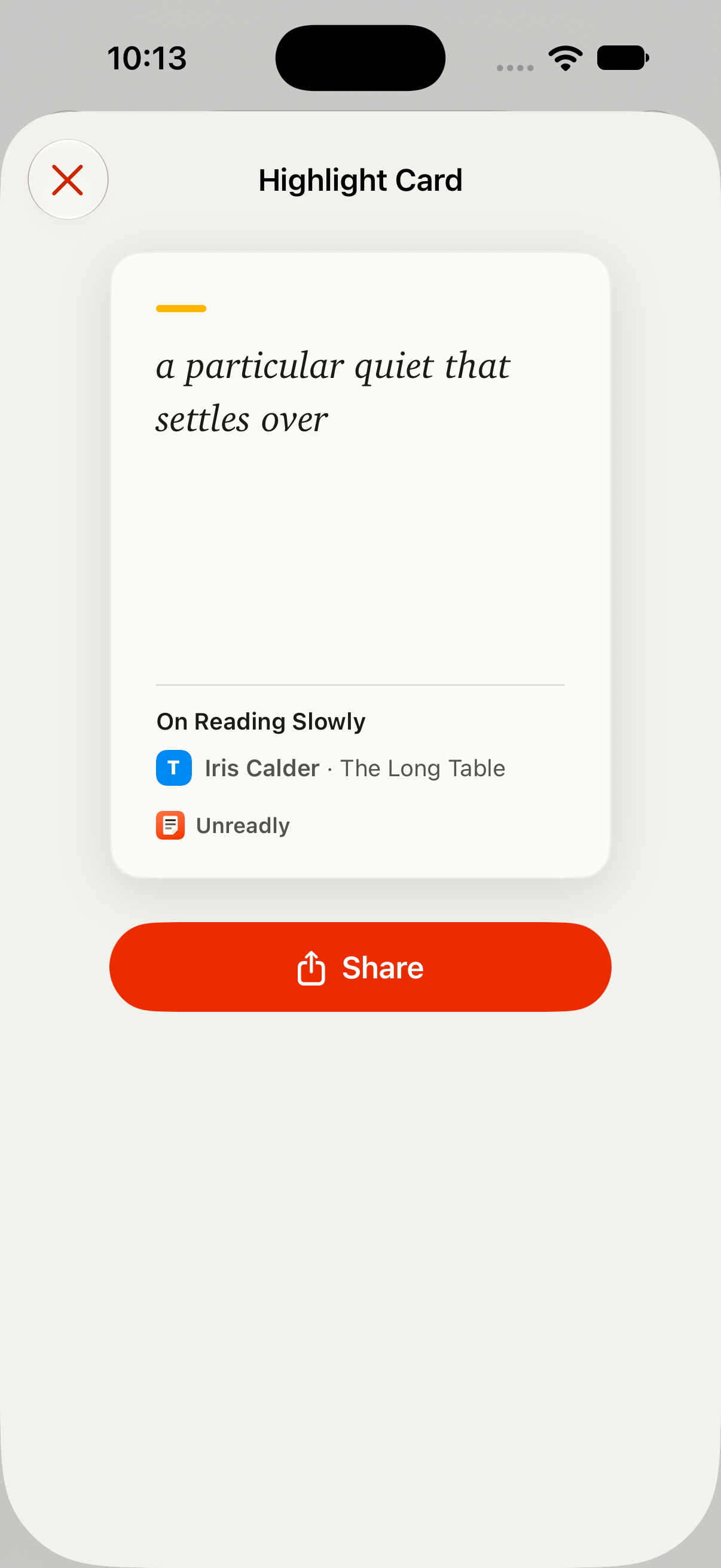
A Highlight Card on iPhone, ready to share, with the Article’s title and Source.
A Highlight Card, to share
  • iCloud Sync

    With Pro, your library syncs through your own iCloud, Highlights, Notes and the place you stopped included.

  • Handoff

    Pick up an Article on your next device, at the same line.

  • Widgets and Controls

    Continue Reading and Up Next on your Home Screen, the Unread count on your Lock Screen, and Controls for saving.

  • Spotlight and Shortcuts

    Find an Article from anywhere on your device, and build it into your Shortcuts.

Your library

Your library is yours, and stays that way.

Unreadly keeps your library on your own devices and, with Pro, in your own iCloud. There’s no account to make, and nothing of yours on a server of ours.

  • No account, no server of ours

    There’s nothing to sign up for. Your library is kept on your devices, readable offline. With Pro it syncs through your own iCloud, which we can’t read.

  • It can’t be shut down

    If we disappeared tomorrow, every Article, Highlight and Note would still be on your devices, readable offline. Unreadly can’t be shut down the way Pocket and Omnivore were.

  • Export everything, free

    The whole library in one step: Markdown, HTML, CSV, or JSON with your Highlights as W3C Web Annotations. Unreadly reads its own export back without losing a thing.

  • No tracking, no ads

    Crash reports carry codes and timings, never a title, a link or a word you saved. Pages open in the Web view with known trackers blocked.

Read the Privacy Policy

Agent access Mac

Let your agents read with you.

Turn on Agent access, and the AI agents and scripts on your Mac can read your library, search it, save links and organize Articles, through Unreadly’s MCP server and the unreadly command.

  • Off until you turn it on, and only for agents on that Mac.
  • Every change shows in Agent activity, where you can undo it.
  • Five Agent skills teach Claude Code, Codex and others how to use it safely.

An agent may send what it reads to its own AI provider, under its own terms.

Free and Pro

Free is a real reader. Pro is the whole library.

Start free on one device, with Samples of what’s in Pro. Go Pro for your library on every device, AI, Listen and the tools for a big collection.

Free

A real reader, on one device.

  • 30 Unread Articles in your Inbox, and an Archive without limit
  • The reader, in Charter, with Paper and Night
  • Three Highlights in every Article
  • Search by title, Source, Author and link
  • Import from six apps, and Export everything
  • The share sheet, Safari, Shortcuts, Control Center and widgets

Samples of Pro

  • 5 Summaries a month
  • The first 5 minutes of Listen in every Article
  • A full-text search a day
  • 3 Snapshots
  • 3 saves from Chrome
  • 25 agent requests

Unreadly Pro

Your library, everywhere, with everything.

  • iCloud Sync on your iPhone, iPad and Mac
  • An Inbox with no cap
  • Highlights and Notes without limit, and the Highlights library
  • Full-text search, of every word you’ve saved
  • Summaries, Ask and Suggested Tags
  • Listen to whole Articles
  • Translation
  • Snapshots of every page
  • Saving from Chrome on the Mac
  • Every reader theme and face
  • Smart collections
  • An Export folder that stays current, ready for Obsidian
  • Agent access on the Mac
  • Handoff, and Spotlight that finds the text

Monthly or yearly, with a 7-day free Trial on the yearly plan. One purchase covers your iPhone, iPad and Mac. Prices are on the App Store.

Nothing you’ve saved is ever locked. If Pro ends, every Article, Highlight and Note stays, readable and ready to export.

Set it aside.
Come back to it.

Unreadly for iPhone, iPad and Mac, on iOS 27, iPadOS 27 and macOS 27.

Coming soon to theApp Store

Questions, or a page that didn’t save well? support@caffeinatedcode.co